Showing posts with label Project Mouse. Show all posts

Tuesday, March 1, 2016

Scrapping WDW | My Favorite Apps for iPhone Photos

Six years ago I would never have believed you if you told me I wouldn't be carrying my DSLR to Walt Disney World anymore. I mean, I am the queen of snapping vacation photos! I love to catch every moment - many times! And I actually scrapbook. Photos are a major part of my vacation experience anywhere I go.

But I have, in fact, been photographing my family exclusively with my iPhone for last several years. It may be because I now have two toddlers who keep me on my toes! Or it may just be the fact that I feel like my entire life is on my iPhone. Whatever caused the switch, I am quite happy with it. Let's face it; the iPhone is smaller, easier to pop out to catch that photo with, and always with me!

I'm guessing I'm not the only one who is experiencing this change in photography habits. So here are some of my favorite apps. They both help me post great pictures on the fly (to Instagram and Photos) and get them ready for the scrapbook! In full disclosure I use an iPhone 6 and have only tried these with the iPhone.

1. Snapseed - This is my go to app for any of the photo editing basics like brightness, contrast, and tone; it also has the ability to add some fancier features for filters, grain, etc. This app is free.
Edited completely in Snapseed

2. PicFrame - easy to use collage app that allows you to change the shape of just one photo. App price is $0.99
PicFrame was used to create this collage

3. Big Lens - my newest favorite! With this app you can create the effect of changing your aperture on a DSLR. Essentially you can get your subject to stay in focus and blur the background after you've taken the photo. App price is $0.99
Edited in Big Lens and Instagram

4. Squaready - can edit any photo to fit a square frame. Very easy to use and uploads directly to IG if you wish. It has several other functions, but I don't use them. This app is free.

5. Over - gives you the ability to put text and or art work on your photos. It's interface is super easy and allows for the basics. App price is $0.99
Over was used to caption this photo Doors Of Dublin

6. Rhonna Designs - this is for lots of artwork options and text. I use it sparingly, but it has lots of options for design. And there are tons of preloaded phrases and goodies so you don't have to come up with them yourself, all for an additional cost. App price is $1.99

7. RealBokeh - allows you to add bokeh to your photos after you've taken them. You can choose where to put it and what shape you want. There is also a Mickey mouse shape perfect for your Disney photos! App price is $1.99


And there you have it! The apps I use to edit my iPhone photos. Once you have the hang of it, it's easy to do while waiting in line or for your ADR! Until next time, may all your days be filled with fairy dust!

Saturday, May 30, 2015

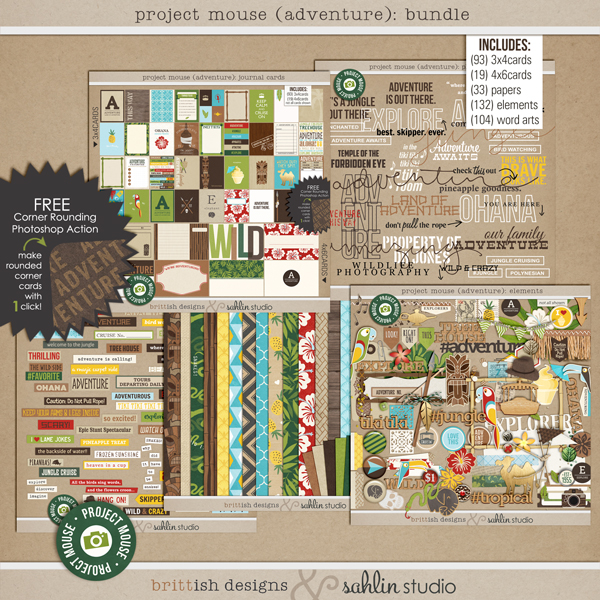
Scrapbooking WDW | NEW Project Mouse Adventure Bundle Released!

Just yesterday my favorite scrapbook designers brittish designs and  sahlin studio released a new Project Mouse kit themed to Adventureland in Disney's Magic Kingdom! My regular readers will know how very excited I am to snap it up and add it to my ever growing collection of digital scrapbook supplies!

I think Disney scrappers will also be able to use parts of this kit for those Animal Kingdom layouts as well as some Animal Kingdom Lodge pictures! This one is definitely a keeper! And you don't have to be a digital scrapper to use the kit. It comes with print files if you want to print them and use them for your Project Life albums as well.

Be sure to stop by the sahlin studio blog and the brittish designs blog for inspiration and to grab the freebie that goes along with this kit! (There is a lot of scrolling through the post, but it's worth it!) And right now the whole kit and caboodle is on sale at The Lilypad! Up to 30% off!

I have no affiliation with Project Mouse, I just love this digital scrapbooking product and want to share all the Disney goodness with my readers. Until next time, may all your days be filled with fairy dust!

Thursday, April 16, 2015

Scrapping WDW | My Favorite Apps for iPhone Photos

Five years ago I would never have believed you if you told me I wouldn't be carrying my DSLR to Walt Disney World anymore. I mean, I am the queen of snapping vacation photos! I love to catch every moment - many times! And I actually scrapbook. Photos are a major part of my vacation experience anywhere I go.

But I have, in fact, been photographing my family exclusively with my iPhone for last several years. It may be because I now have two toddlers who keep me on my toes! Or it may just be the fact that I feel like my entire life is on my iPhone. Whatever caused the switch, I am quite happy with it. Let's face it; the iPhone is smaller, easier to pop out to catch that photo with, and always with me!

I'm guessing I'm not the only one who is experiencing this change in photography habits. So here are some of my favorite apps. They both help me post great pictures on the fly (to Instagram and Photos) and get them ready for the scrapbook! In full disclosure I use an iPhone 6 and have only tried these with the iPhone.

1. Snapseed - This is my go to app for any of the photo editing basics like brightness, contrast, and tone; it also has the ability to add some fancier features for filters, grain, etc. This app is free.
Edited completely in Snapseed

2. PicFrame - easy to use collage app that allows you to change the shape of just one photo. App price is $0.99
PicFrame was used to create this collage

3. Big Lens - my newest favorite! With this app you can create the effect of changing your aperture on a DSLR. Essentially you can get your subject to stay in focus and blur the background after you've taken the photo. App price is $0.99
Edited in Big Lens and Instagram

4. Squaready - can edit any photo to fit a square frame. Very easy to use and uploads directly to IG if you wish. It has several other functions, but I don't use them. This app is free.

5. Over - gives you the ability to put text and or art work on your photos. It's interface is super easy and allows for the basics. App price is $0.99
Over was used to caption this photo Doors Of Dublin

6. Rhonna Designs - this is for lots of artwork options and text. I use it sparingly, but it has lots of options for design. And there are tons of preloaded phrases and goodies so you don't have to come up with them yourself, all for an additional cost. App price is $1.99

7. RealBokeh - allows you to add bokeh to your photos after you've taken them. You can choose where to put it and what shape you want. There is also a Mickey mouse shape perfect for your Disney photos! App price is $1.99


And there you have it! The apps I use to edit my iPhone photos. Once you have the hang of it, it's easy to do while waiting in line or for your ADR! Until next time, may all your days be filled with fairy dust!

Saturday, November 15, 2014

Scrapping On The Fly in Walt Disney World


I have made no secret of my love for Project Mouse. I have used it to scrapbook our family's last several Disney trips, as well as a few other layouts, and it's sure to be used to scrap the next several trips as well. But recently, I have also found the Project Life app. I love the flexibility it offers, how easily I can create layouts and record memories. 

I really wanted to be able to incorporate using the Project Life app into my scrapbooking as well. The Project Mouse kits are not offered as part of the Project Life app and I was lamenting this to my friend, Flora, on our recent trip to Disney. She suggested I save the cards from Project Mouse as pictures and then import them into the app when I want them. And you know what? It works! This is revolutionary for my scrapping habits, y'all! I could actually be current in my scrapbooking within the next year. That has never happened to me before! I welcome the possibility.

I am a devoted Mac user, so all my equipment is from Apple. If you are an android user, perhaps this could work for you as well, I have no experience with that. All I know for sure is that doing it this way, with iPhoto, the use of iCloud, and my iPhone, this process worked for me! 

Here's exactly how I made it happen:


  1. I selected all the cards I thought I might want while on our last Disney trip and imported them into iPhoto.
  2. I moved all those cards into an iCloud album called Disney Cards.
  3. When I was ready to journal on one of them, I opened it up in Rhonna Designs (I used this app because I love the fonts available, but any app that allows you to add text to photos would do the trick.)
  4. I added the text I wanted to the photo and saved it to my camera roll (or photos).
  5. I opened up the Project Life app.
  6. I added the card I just edited as a photo in the layout. Voila! The layout is done and my favorite Project Mouse cards were used!
All these cards were scrapped in the moment (or shortly there after) in Walt Disney World or on the road home. I cannot tell you how much I love being able to capture my thoughts about our trip, and any of the little details, before they are gone. 

I don't like scrapping out of order, so I am usually having to remember long after the fact what we were doing and who was happy (or not) about it. But by creating these cards the day the moment happens I can get those thoughts down before they are gone. And when I save the image, it's in order in my photo stream so I will see it when I go to scrap the layout! No more forgetting the little things! I could not be happier! Scrapbooking just got a whole lot easier.

Until next time, may all your days be filled with fairy dust!


Thursday, October 30, 2014

DIY Disney Scrapbook Inspiration | Project Mouse and WDW

Today I give you some more scrapbook pages from our 2013 trip. I have to admit, I love scrapping Disney! And as usual, I have made liberal use of my favorite Disney scrapbook kits: Project Mouse. What can I say? They speak to me. And I have also discovered Mousescrappers.com. What a great way to find Disney inspiration and scrapbooking kits! If you haven't checked them out, it's worth a stop.

I hope these pages will inspire your layouts. If they do, I'd love to see them! Leave me a comment or tag me on Instagram. Until next time, may all your days be filled with fairy dust!


Tuesday, September 16, 2014

Scrapbooking Disney | Project Mouse Frontier Bundle


So these layouts are NOT of Walt Disney World, I realize, but I did use an amazing new kit from Project Mouse and I wanted to share with you all how versatile it is!

We live in the Indianapolis area, and one of our favorite local treasure is the Eiteljorg Museum. If you ever have the opportunity to visit, I highly recommend it. They are very family friendly, as you can see, but they also have amazing displays of all things Native American and specifically items and artwork from the Southwest. We are lucky to have such a unique place in the midwest!

That said, it was hard for me to find scrapbooking elements that were not cartoony for the scrapbook. I was so excited when Britt-ish Designs and Sahlin Studios released this kit! I knew we would use it for our Walt Disney World pages - Doc is quite the sharpshooter at the Shootin' Arcade! But I also knew it would be well used for our Eiteljorg layouts as well.

You can get all the information on the new Project Mouse Frontier Bundle here. As my regular readers will know, I am a huge fan of Project Mouse!

Until next time, may all your days be filled with fairy dust!

Tuesday, August 12, 2014

DIY Disney Scrapbook Inspiration | Project Mouse & Walt Disney World, Installment 3

Some of my favorite memories have been made in Walt Disney World. This vacation was no exception. And so while everyone is busy with summer plans, vacations, and school starting up (gulp!), I thought this would be a great time to showcase a few more Project Life style pages that I completed from our 2012 trip. I keep saying how much I love using the Project Mouse kits by Sahlin Studios and Britt-ish Designs, but it's the best product out there for my money. 

For these pages I used Project Mouse Bundles 1, 2, & 4, plus the Days & Washi Tape Bundle, the Halloween Bundle, and the Fantasy Bundle. I also used the Stuffed with Fluff kit from Britt-ish Designs, and the Now Showing Mini Kit from Tickled Pink Studios. Until next time, may all your days be filled with fairy dust!